Ready for Your Custom Savings Illustration?

You have seen what a PlanForge 401(k) can do for businesses like yours. Now let us build an illustration tailored to your actual numbers. This short questionnaire (about 5 minutes) gives us everything we need to design a plan around your company's structure, your goals, and your bottom line.

When you are done, we will put together a detailed, personalized report showing your projected tax savings, employer credits, and the net cost of your plan. No obligation, no pressure, just real numbers so you can make a smart decision.

Pay your team, not the IRS.

Nick Moore
Nick Moore, CFP®
Founder, PlanForge Consulting
PlanForge Consulting
401(k) Ownership & Business Questionnaire
Help us design the ideal plan for your business. Takes about 5 minutes.
Plan Status Business Pay Ranges Owners Contact
Welcome back! You have a saved draft.
Fields pre-filled from the Tax Savings Calculator. Please review and adjust as needed.
Plan Status & Ownership
Let's start with where you are today.
This determines controlled group status for testing & tax credit eligibility.
Controlled Group Details

Family members (siblings, parents, grandparents) with ownership may also create a controlled group. This impacts tax credit eligibility. Owners and their controlled group are not eligible for SECURE Act credits.

Controlled Group: Family Employees
Who qualifies as a controlled group family member?
Under IRC attribution rules, the following relatives of an owner are considered related parties: spouse, children (and grandchildren), parents (and grandparents), and siblings. If any of these family members work at the company, they are classified differently for plan testing purposes.
This helps estimate vesting forfeitures.
Select all that apply
e.g. Fidelity, Vanguard, John Hancock, ADP, Guideline
Total admin + recordkeeping + advisory fees (a rough estimate is fine)
Business Basics
Tell us about your company structure and workforce.
Upload payroll data for the most accurate illustration, or enter counts manually
Upload Employee Data

Upload a CSV with employee names, ages, salaries, and type (Owner/HCE/NHCE). We will auto-fill everything from your file.

Have payroll data? Upload a CSV to auto-fill employee counts and details below.

↓ Download Template

ADP / RUN Powered by ADP

  1. Go to Reports > Standard Reports
  2. Run the Employee Census or Worker Demographics report
  3. Click Export and choose CSV
  4. Save the file, then upload it here

Gusto

  1. Go to People > Team Members
  2. Click the Actions dropdown > Download team roster
  3. The CSV downloads automatically with names, pay, and dates of birth

Paychex

  1. Navigate to Reports > Employee Information
  2. Select Employee Listing or Demographics Report
  3. Set output format to CSV and click Run Report

QuickBooks Payroll

  1. Go to Reports > Employees & Payroll
  2. Run Employee Contact List or Payroll Summary
  3. Click Export to Excel, then Save As > CSV

Other Providers

  1. Look for an Employee Census, Demographics, or Roster report
  2. Export as CSV or Excel (we accept both)
  3. The file should include employee names, ages or dates of birth, and annual pay
Tip: Don't have a CSV? No problem. Click "Enter employee counts manually" above to type in the numbers instead.
📄
Drop files here or click to upload
Pay stubs, W-2s, census data, or any payroll document
Employees earning $160K+ (2025/2026)
All other eligible employees
Helps estimate cross-testing benefit factors (a rough estimate is fine)
You can provide each employee's age and pay instead of averages
Individual Employee Data

Each employee's age and annual pay for the most accurate cross-testing illustration.

Pay Ranges
Estimates are fine. We'll fine-tune during plan design.
Low end
High end
Low end
High end
Owner Compensation
How are the owners compensated?
W-2 salary for S-Corp or C-Corp owners
Preferences & Contact
Almost done! Let us know how to reach you.
When would you like the new plan (or upgrade) to go into effect?
Review Your Answers
Make sure everything looks right before submitting.

Thank You!

We've received your information. A PlanForge consultant will review your answers and reach out within 1 business day with a preliminary plan illustration.

Want to get started sooner?

Skip the wait, schedule a complimentary plan design consultation directly on our calendar.

Schedule a Consultation
or

We'll reach out within 1 business day either way. No action needed.

Sent! Your CPA will receive a summary.

Discover the Benefits of Tailored 401(k) Plans

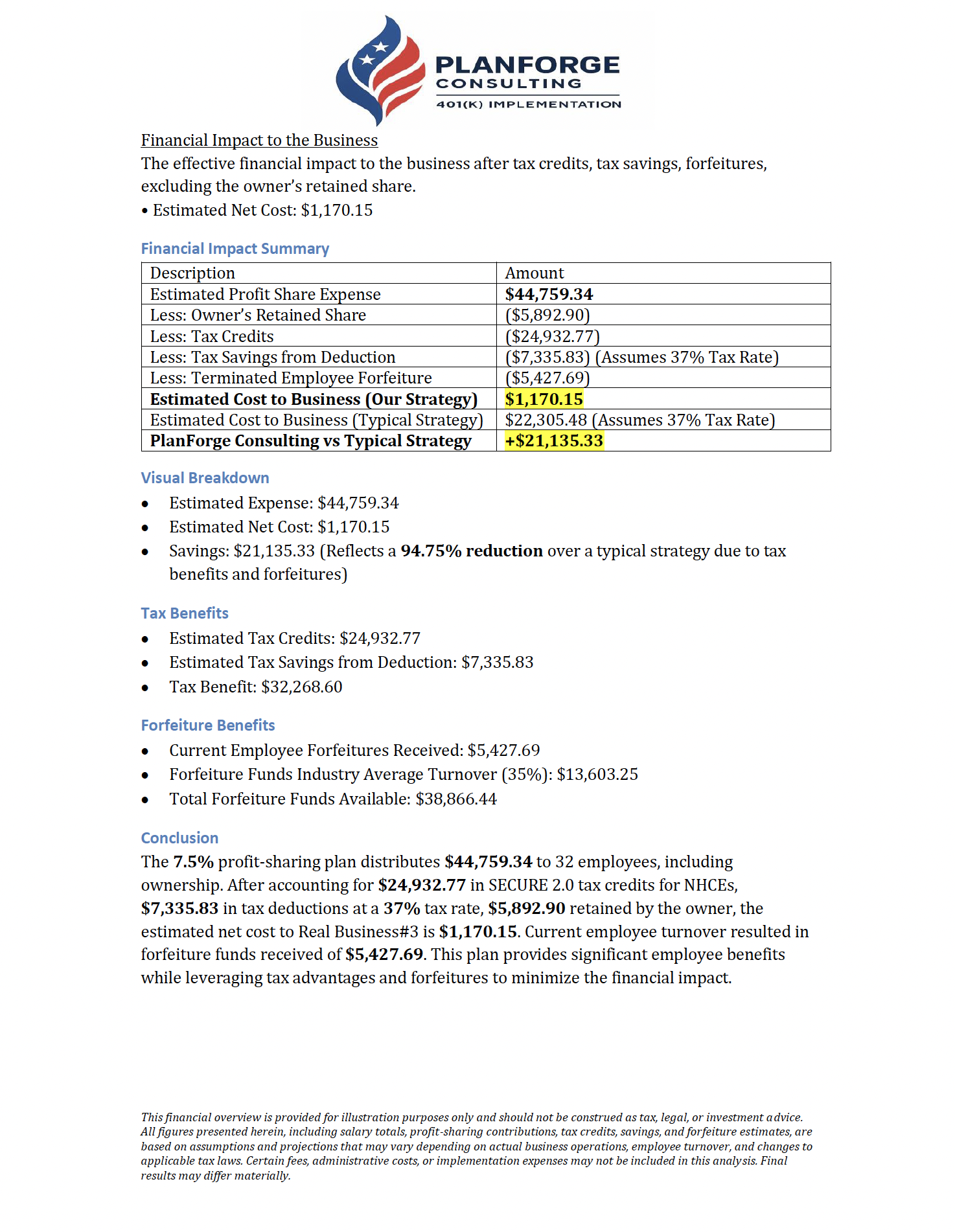
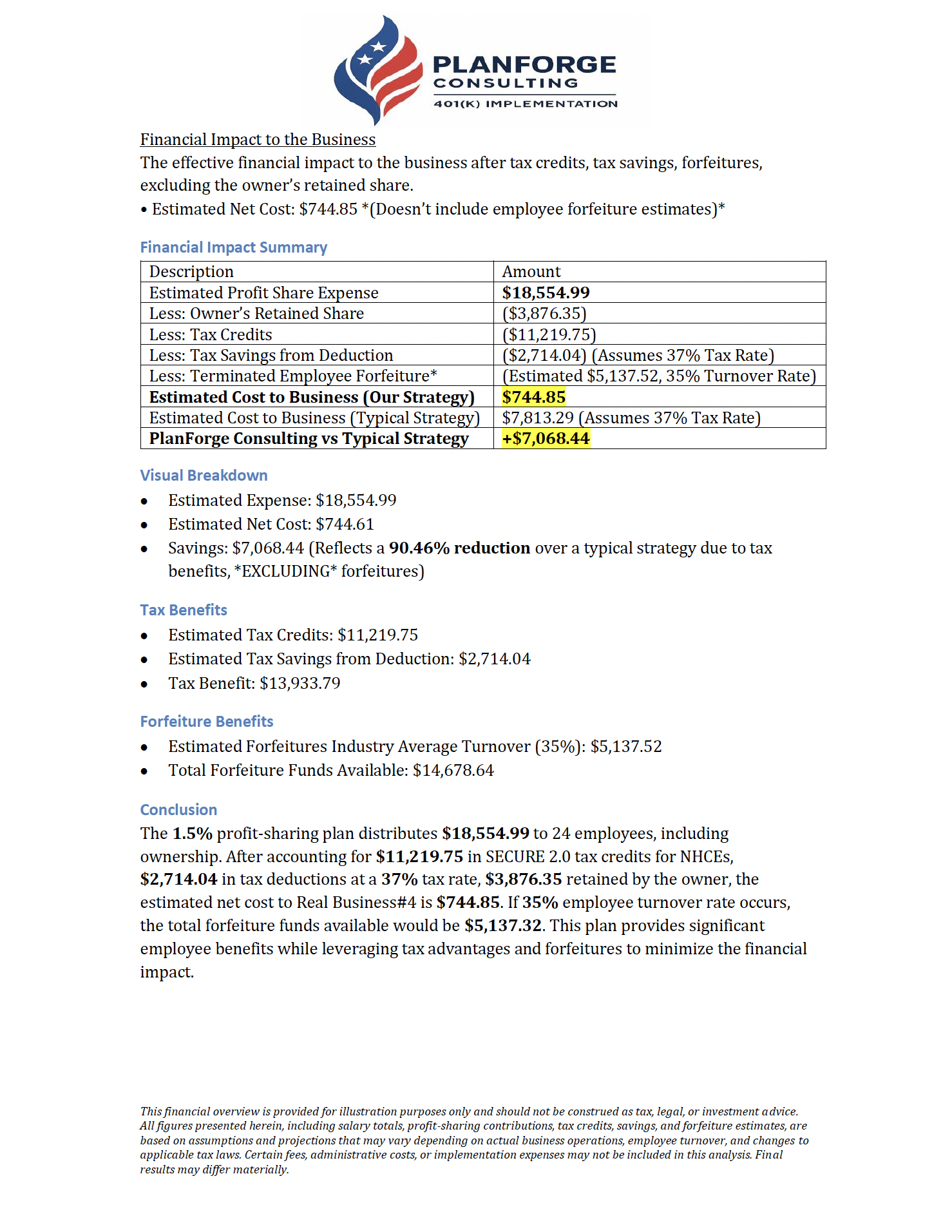
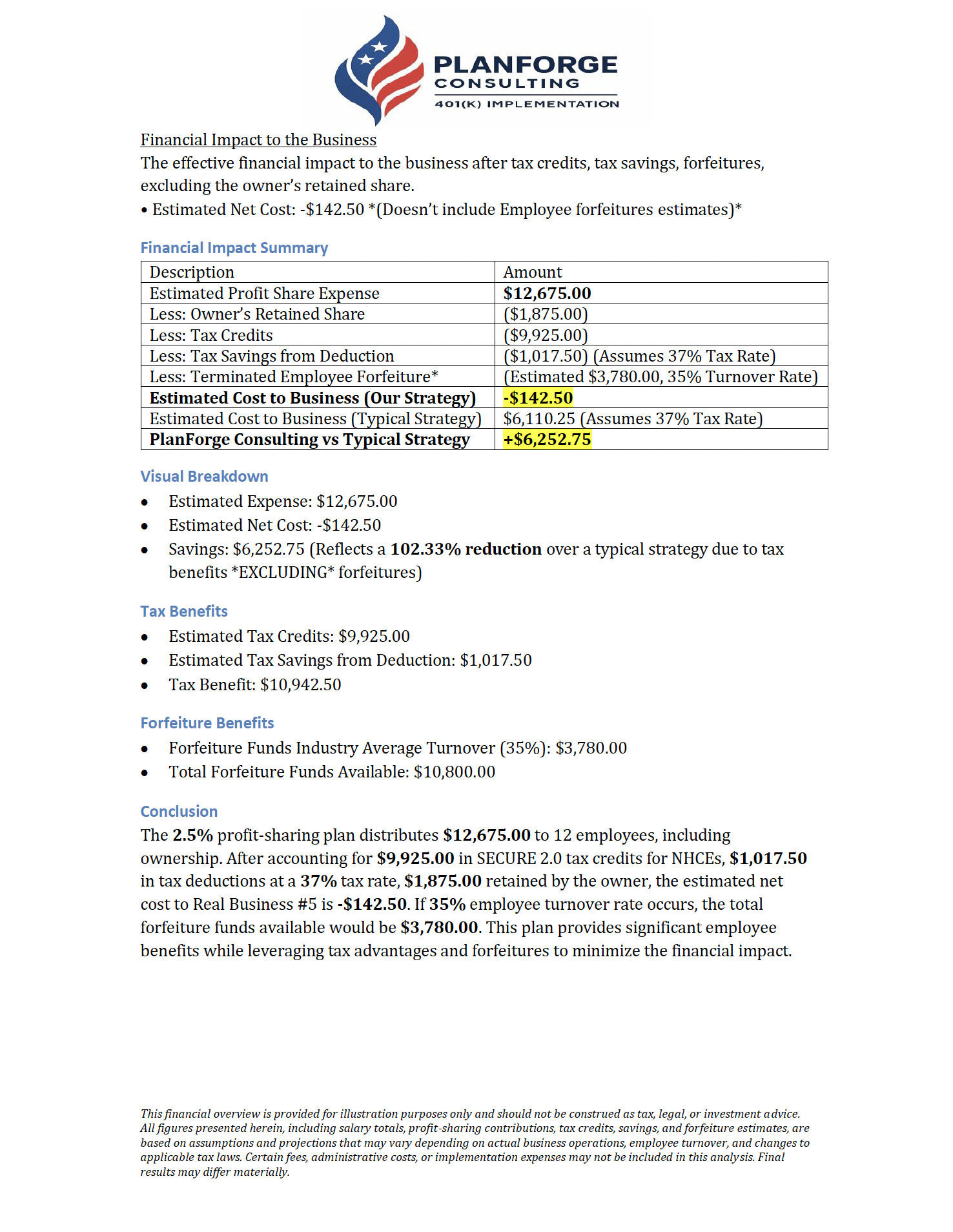
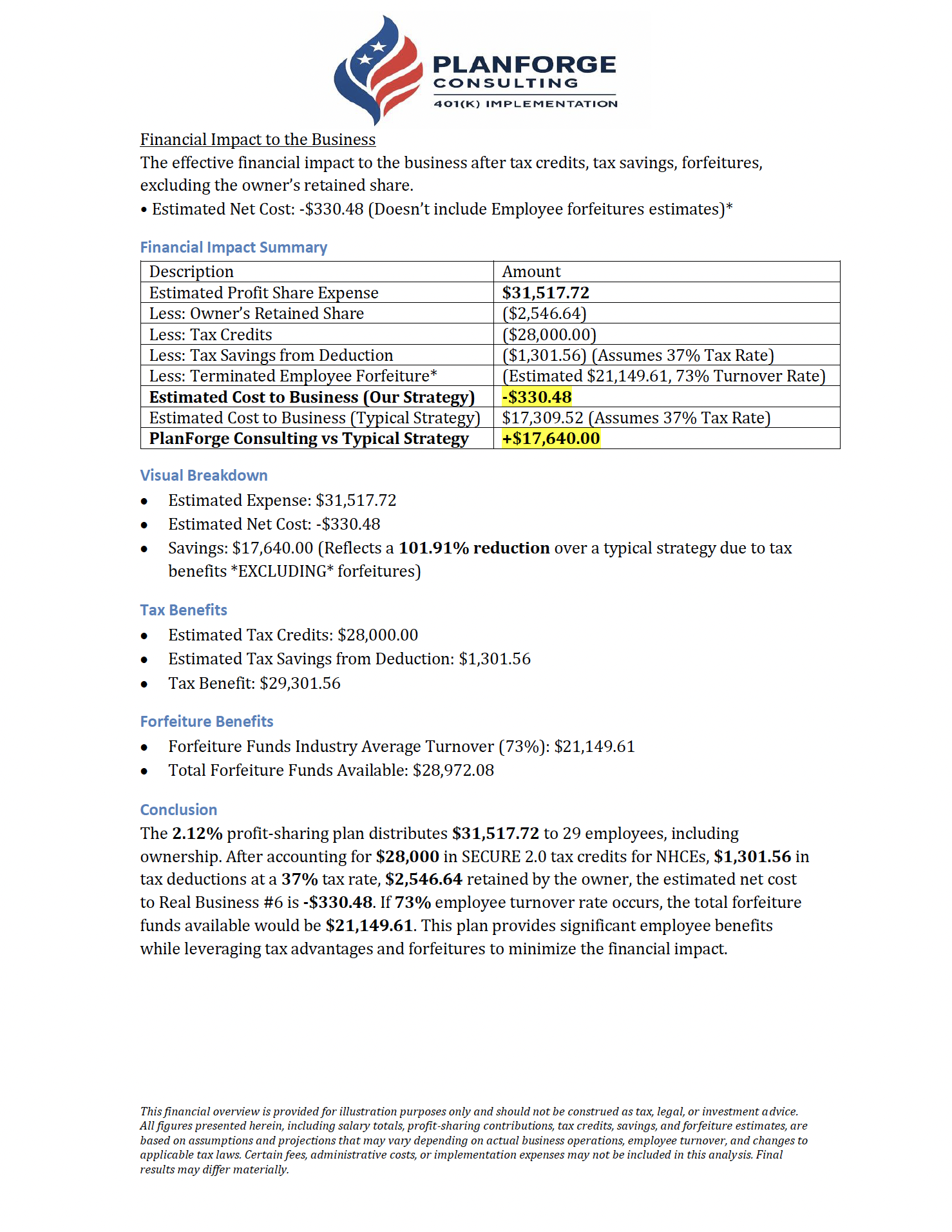
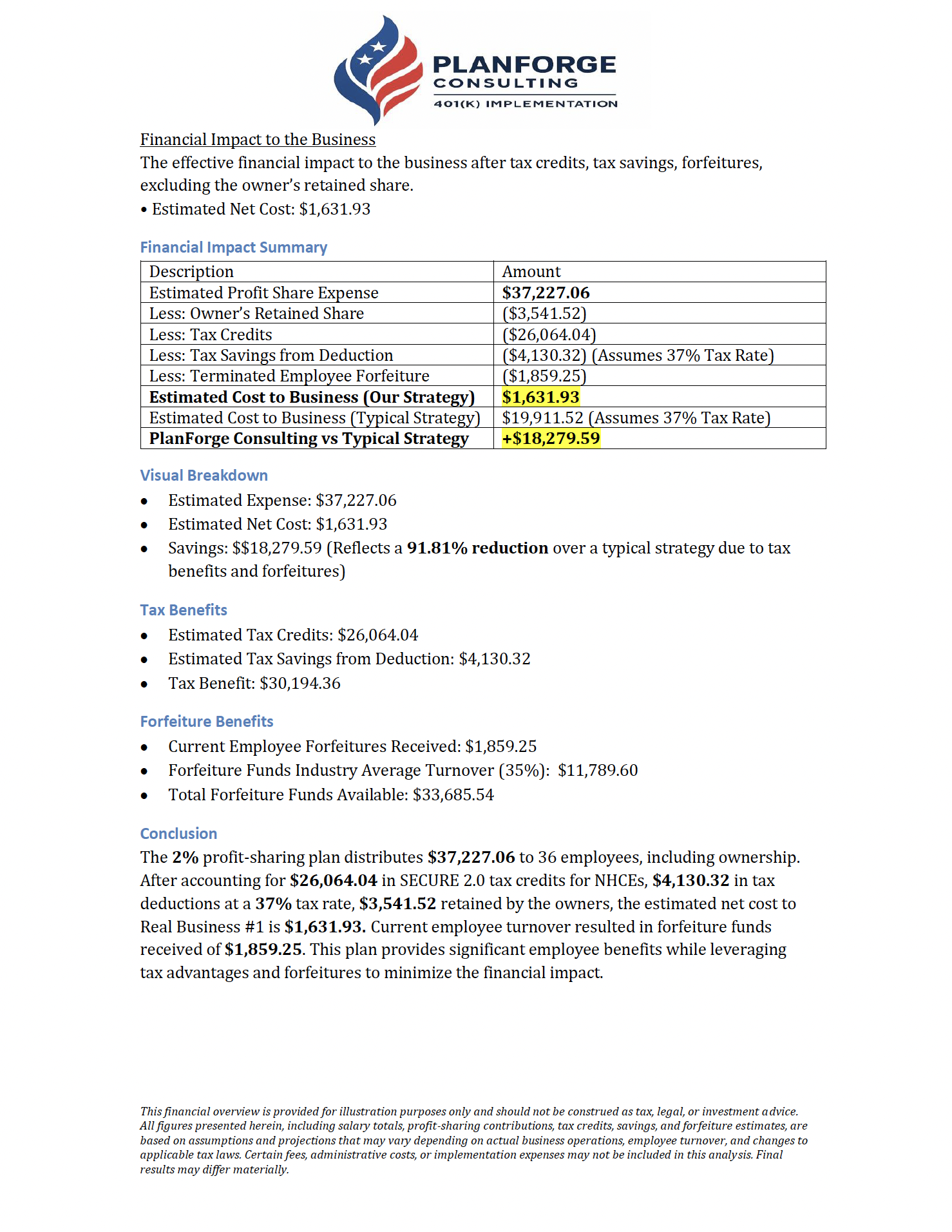
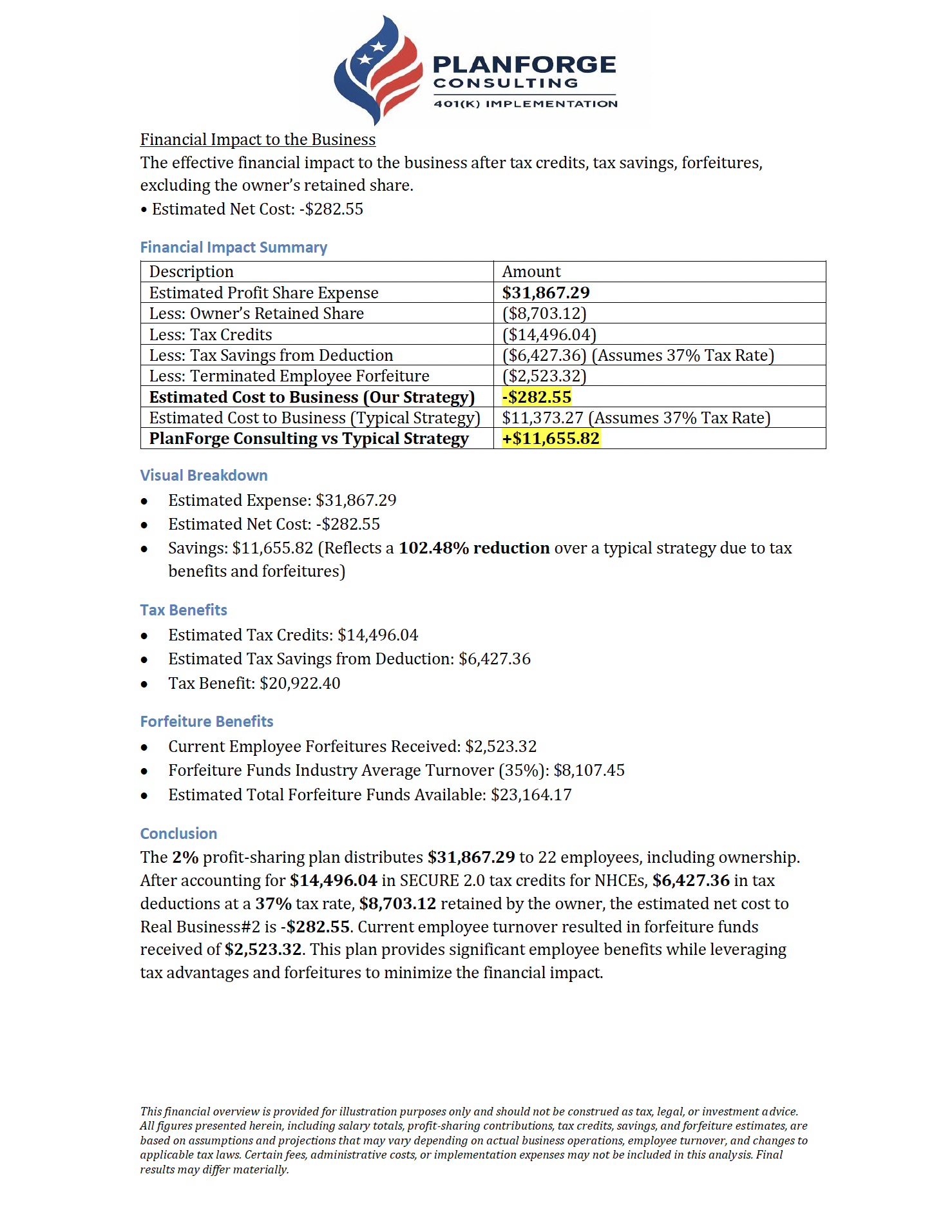
Our custom 401(k) plans help small businesses cut costs, earn more tax credits, and keep great employees. With SECURE Act 2.0, most of our clients save 90% or more.

Fill out the short form below to get started. It takes about three minutes. Once we have your answers, we build a free savings report just for your business.

You will see exactly how much you could save before you make any decisions.

in available SECURE Act 2.0 tax credits for small businesses
$ 50000 +
average reduction in employer net cost for 401(k) plans
Over 25 %+
optimal window for maximizing benefits and tax credits.
15 - 25 Employees
potential annual tax savings for business owners
$ 10000 +

How Free 401(k) Illustrations Work

Tell Us About Your Business

Answer a few quick questions about your business structure and team size. It takes about 3 minutes and no documents are needed. We use this to model SECURE Act 2.0 tax credits, deductions, and the plan design that saves you the most.

We Optimize Credits, Deductions & Plan Design

Our experts model SECURE Act 2.0 credits, tax deductions, employer match/profit-sharing, and likely forfeitures to optimize your plan. Then we show PlanForge's Strategy compared to the average 401(k) in a simple side-by-side.

Get Your Custom Savings Report

Within one business day, you'll receive a personalized PDF showing your projected tax savings, credit offsets, and net plan cost. Every illustration is built around your actual payroll and ownership data, not generic estimates.

Review the Numbers Together

Have questions? Schedule a 15-minute call to walk through your report, confirm assumptions, and see exactly how a net-zero cost 401(k) works for your business. No pressure, just clarity.

Success Stories

Get in Touch

Contact Planforge Consulting

We’re here to help small business owners build cost-effective 401(k) plans. Schedule a free consultation or submit last year’s W-2s for a custom quote today.

Schedule a Free Consultation

Discover how much you could save on your retirement plan. Schedule your free consultation now or call us at 214-908-2310.

Launch When You're Ready

Once you're comfortable with the numbers, we handle everything: plan documents, payroll integration, employee enrollment, and ongoing compliance. Most plans are live within 2-3 weeks. You focus on your business while we take care of the rest.

Reach Out Directly

Have questions or interested in partnership opportunities? Contact us by email at Partnerships@PlanForge401k.com or complete our 3-minute Partnership Form. We're happy to assist you.

PlanForge Consulting